Skip to content

Category: SQL Server Availability groups

SQL Server Availability groups 1

Patching of SQL Servers in Availability Group

Nowadays, this is the common question that, “How to perform the patching of SQL Servers in Availability group?” or “What are the steps we should follow while patching Availability replica?

The SQL Server AlwaysOn Availability group consists of multiple instances with one primary and multiple secondary replicas.
You are aware that SQL services on these instances/servers are always in a running state. Data continuously flows back and forth on these instances. Such situation makes patching servers complex.

Patching of servers in an Availability group is completely different than the patching of servers in SQL Server Failover Cluster.

Let us see steps to patch SQL servers in AlwaysOn Configuration.

  • Download the security updates or cumulative updates from the below official Microsoft’s site.
    Microsoft Update Catalogue
  • First of all we should take a good backup of Servers and the databases residing on those servers. If possible taking VM Snapshot before the activity is a good option in such scenarios.
  • Generally, we use one secondary replica with “Synchronous commit mode with Automatic Failover” option. Another secondary replica uses “Asynchronous Commit mode with Manual Failover”. Keep in mind that we need to change the failover mode of both the replicas to “Manual Failover”.
Change Failover Mode from Automatic to Manual for all availability replica
  • If the availability mode of a replica is “synchronous commit”, SQL Server waits for transactions to apply on the secondary server. Then, it commits on the primary server.
  • If for any reason the secondary server is not available, it will start increasing the size of transaction logs. This will start creating further issues.
  • To avoid this we should change the availability mode of replicas to “asynchronous commit”. so that SQL server will not wait for the transactions to be applied on secondary servers.
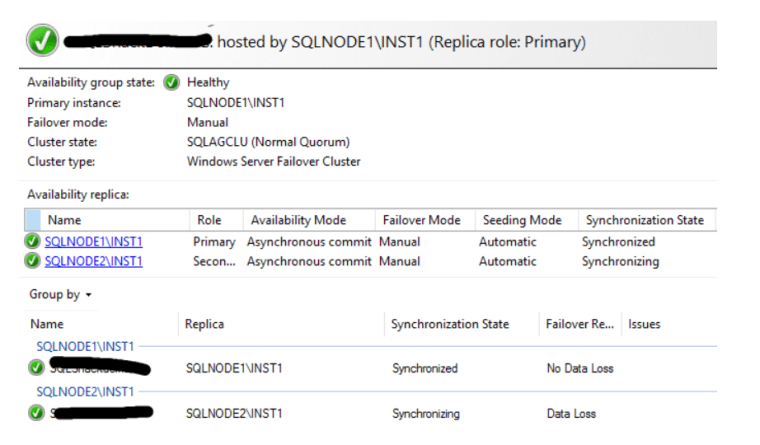
Availability Replica with Asynchronous commit mode
  • Now go to secondary server and apply service packs, cumulative patches or OS patches.
  • Make sure that all the patches are successful and the given secondary server has been rebooted as per requirement.
  • Once server comes online make sure to bring all SQL services up and running. Validate all the SQL services and databases are running as expected.
  • Check the SQL server error logs for any errors.
  • Now connect to database instance and go to Availability Group Dashboard and verify everything is healthy.
Example of Healthy Availability Group Dashboard
  • Now perform the manual failover from primary replica to the secondary replica.
  • After the failover existing primary replica becomes the secondary replica. Perform all above steps to patch new secondary server as well.
  • Once you finish the patching for this server check the SQL server versions of all the replicas.
  • Ensure that the patches you have installed are applied successfully on all the replicas. Verify that all the SQL servers are in the same configurations with the same Cumulative updates.
  • Now go to the properties of Availability group and change the failover mode and availability mode with the original settings.

Now you have successfully completed the patching of servers in Availability group.

Check all related articles

SQL Server Availability groups 2

SQL Server Availability Group in AlwaysOn

In earlier article we learn about the requirements/ prerequisite for SQL Server AlwaysOn Configuration”. Now lets see about the SQL Server Availability Group.

SQL Server Availability Group is an alternative to database mirroring.

In SQL Server, Availability Group is a collection or group of user databases which failover together. Databases participated in this are called as Availability Databases. In mirroring, replicas are limited to principle and mirror database. However, in availability group, it supports read-write primary databases. It also supports multiple secondary databases which are accessible for read-only operations.

Database failover is not related to individual database issue such as database file or transaction log file corruption. It is related to the issues at a SQL server instance level. Failover occurs on per replica basis and all the databases in the SQL server Availability group replica fail over.

Availability Modes

Availability Modes of SQL Server Availability Group depends on data loss and transaction latency requirements. There are two types of availability modes.

  1. Asynchronous-commit mode
  2. Synchronous-commit mode

Asynchronous-commit mode

In your SQL Server Availability Group, if replicas are placed at geographically dispersed locations, you must use Asynchronous-commit mode. When you configure a secondary replica with Asynchronous-commit mode, the primary does not wait for the secondaries to write log records to disk. It will run with minimum transaction latency.

If you configure the primary replica with Asynchronous-commit mode, then the transactions for all replicas will be committed asynchronously. This happens irrespective of the mode of each secondary replica.

Synchronous-commit Mode

In Synchronous-commit mode transaction latency is more, but it minimizes the chance of data loss when automatic failover happens. Each transaction is applied to secondary before being written to the local log file. The primary database always verifies that the transaction has been applied to the secondary. After that, it enters into the Synchronized state.

SQL Server Availability Groups Properties

Failover Modes

As we already discussed, in SQL Server Availability groups failover at availability replica level. When failover happens one of the secondary replica becomes a primary and original primary replica becomes secondary replica. SQL Server Availability groups supports three types of failover modes.

  1.  Automatic failover
  2. Planned manual failover
  3. Forced manual failover

Automatic Failover

Automatic failover occurs without manual intervention. There will be no data loss occurs during this type of failover. It is supported only if the current primary and at least one secondary replica are configured with automatic failover.

The most important point is automatic failover can occur only if the primary and secondary replica are in synchronous-commit mode.

Planned manual Failover

In planned manual failover, failover is triggered by the administrator. This type of failover is used in case of maintenance activities. There will be no data loss in this type of failover. To perform planned manual failover at least one of the secondary need to be in Synchronized state.

You can perform planned manual failover only if the primary and secondary replicas are in synchronous-commit mode.

Forced Manual failover

Forced Manual failover involves the possibility of data loss. Use this type of failover when none of the secondary replicas are in a synchronized state. You should also use it when the primary replica is unavailable.

If asynchronous-commit mode is used on the primary, then forced manual failover is used. The same applies if the only available replica uses asynchronous-commit mode.

Check all related articles